On June 18, 2026, xAI released a free Grok add-in for Microsoft 365, and the timing is hard to ignore. Microsoft 365 Copilot currently costs enterprises $30 per user per month, a price tag that has kept many teams on the fence. Grok walks in at zero dollars, with a feature set that overlaps enough to start real conversations in IT departments. This is the second major free AI writing tool launched in 2026, and this one lands directly inside the app where most office work actually happens.
How to Use Grok for Word
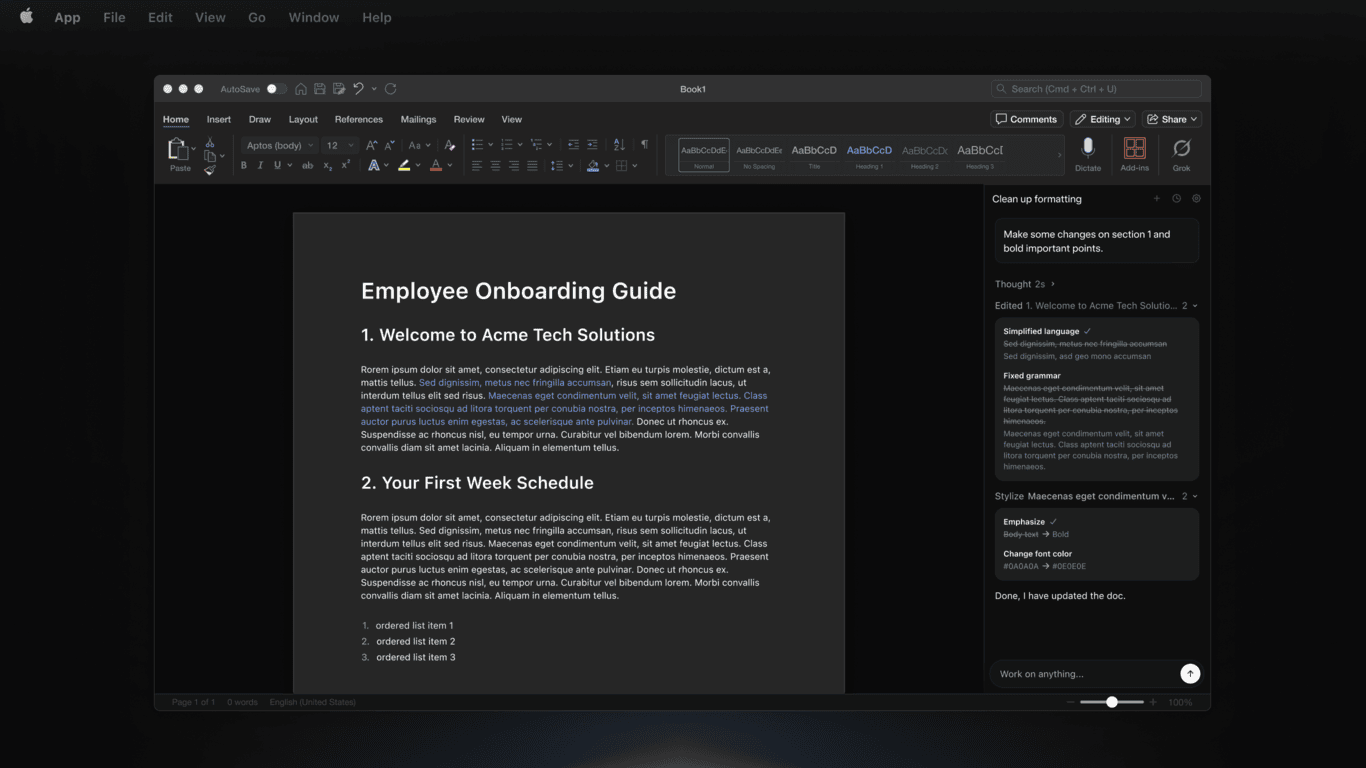
The Grok Microsoft Word add-in 2026 release covers more ground than a simple drafting assistant. Once installed from the Microsoft 365 app store, it becomes available to any Microsoft 365 user at no additional cost and no xAI subscription required. Here is what it brings to the table:
- Turn rough notes or bullet points into polished, formatted documents directly inside Word
- Web research grounded in real-time X and social data, a capability Copilot does not offer
- Connectors to email, SharePoint, and Google Drive for pulling in context from across your workflow
- In-document drafting, summarization, and rewriting without leaving the Word interface
The Google Drive connector is worth noting specifically. Copilot is built around the Microsoft ecosystem and keeps you there. Grok does not make that assumption, which matters for teams running hybrid setups.
How It Compares to Microsoft Copilot for Word
Side by side, the two tools have genuinely different profiles. The price gap is the most obvious difference, but it is not the only one that matters.
| Feature | Grok Add-In | Microsoft Copilot for Word |
|---|---|---|
| Price | Free for all Microsoft 365 users | $30/user/month (enterprise) |
| Underlying model | Grok 3 (xAI) | GPT-4o + MAI-Code-1-Flash |
| Data grounding | Real-time web and X/social data | SharePoint and enterprise knowledge base |
| Integrations | Email, SharePoint, Google Drive | Teams, SharePoint, Microsoft 365 apps |
| Enterprise compliance | Developing | Mature, with admin controls and audit tools |
| Best for | Content teams, researchers, hybrid-stack users | Enterprise teams already deep in Microsoft 365 |
The Real Differentiator: X/Social Data Grounding
This is where Grok does something Copilot structurally cannot. Copilot draws on your organization’s internal documents, emails, and SharePoint data. That is genuinely useful for internal work, but it tells you nothing about what is happening outside your company right now. Grok pulls in real-time data from the web and from X, which means it can surface current trends, market chatter, and viral conversations as it writes.
For a content strategist writing a market overview, that is a meaningful difference. Instead of researching separately and then switching back to draft, the research and drafting happen in one step with current information already baked in. For anyone producing thought leadership, competitive analysis, or trend-driven content, this closes a gap that has required juggling multiple tools until now.
The Catch
Free is compelling, but enterprise teams should not skip the due diligence step. Microsoft’s compliance stack is one of the most mature in the industry. It comes with admin controls, data residency options, audit logs, and certifications that many regulated industries require. xAI’s data handling policies for enterprise use are still developing, and that gap matters if your documents contain sensitive client data, legal materials, or anything subject to compliance requirements.
This is not a dealbreaker for most users, but it is a real consideration for legal, healthcare, and financial teams. If your IT or legal team has not reviewed xAI’s enterprise terms, that review should happen before widespread rollout.
Wrapping Up
If you are a writer, content strategist, researcher, or anyone who drafts documents that benefit from knowing what is happening in the world right now, install the Grok add-in today. The price is zero, the setup is straightforward, and the real-time social grounding is a genuine capability you are not getting from Copilot at any price point.
If you work in a regulated industry or your organization has strict data governance requirements, wait until xAI’s enterprise compliance documentation catches up. Copilot’s edge there is real and not something to overlook. For everyone else, this is an easy add that is worth having alongside whatever tools you already use.